


The Safeguarded Copy function supports the ability to create cyber-resilient point-in-time copies of volumes that cannot be changed or deleted through user error, malicious action or ransomware attacks. The system integrates with IBM Copy Services Manager to provide automated backup copies and data recovery.
IBM Copy Services Manager uses a Safeguarded policy to automatically configure FlashCopy mappings and consistency groups in order to create backup copies. When Safeguarded backups are created, IBM Copy Services Manager applies the retention period for the Safeguarded backup according to the settings in the Safeguarded policy. Once the copies expire, IBM Spectrum Virtualize software deletes the expired copies from the Safeguarded backup location.
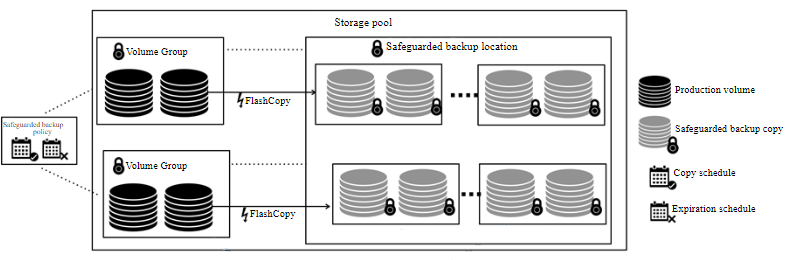
IBM Copy Services Manager polls the system every 5 minutes to process existing Safeguarded policies. The start time defined in the Safeguarded policy must allow for that possible 5-minute delay. When IBM Copy Services Manager detects a new Safeguarded policy for a volume group, it creates the session and scheduled task needed to create and manage the Safeguarded backups.
The Safeguarded Copy function isolates backup copies from production data, so that if a cyber attack occurs you can recover and restore data quickly from the Safeguarded copies.
Suspending Safeguarded Copy
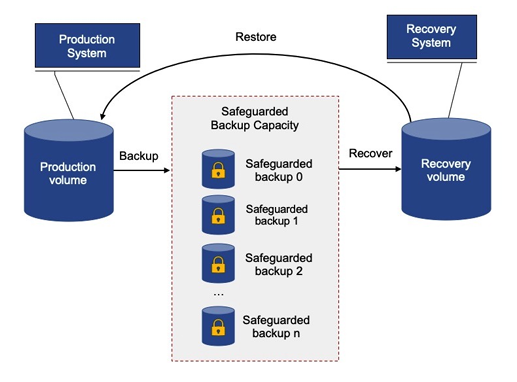
If the source volumes are compromised during a cyber attack or a disaster recovery scenario, the system supports suspending all Safeguarded Copy operations until the compromised data has been identified. During an attack, Safeguarded backups may contain malicious data or software. By suspending Safeguarded Copy operations, you can examine the existing uncompromised backups. An uncompromised backup can then be used with IBM Copy Services Manager to restore or recover the data. Safeguarded Copy is suspended at system level. While the function is suspended, IBM Copy Services Manager does not create new backups in the Safeguarded backup location and prevents expired backups from being removed.
The Safeguarded Copy capability creates protected backups that cannot be accessed by the host system, keeping those backups safe from corruption in the production environment. You can define a Safeguarded Copy schedule to create multiple backups at regular intervals — hourly or daily, for example. You can also restore a backup to the source volume or to a different volume.
With backups that sit outside the production environment, you can use them to restore your environment to a specific point in time. You can also extract and restore specific data from a backup, or use the backup to diagnose production problems.