
Blog
VMware: The Leader in Virtualization
22 November 2023
VMware - The Leader in Virtualization

With VMware server virtualization, a hypervisor is installed on a physical server to allow multiple virtual machines (VMs) to run on that same physical server. Each VM can run its own operating system, which means several operating systems can run on one physical server. All VMs on the same physical server share resources such as network and RAM. In 2019, VMware added support to its hypervisor for running containerized workloads in a Kubernetes cluster in much the same way.
Put simply, VMware develops virtualization software. Virtualization software creates a layer of abstraction over computer hardware that allows the hardware elements of a single computer — processors, memory, storage and more — to be divided into multiple virtual computers, generally called virtual machines (VMs). Each virtual machine runs its own operating system and behaves like an independent computer, even though it is running on a portion of the underlying physical computer hardware.
As you would expect, virtualization allows computer hardware to be used more efficiently and delivers a greater return on an organization's hardware investment. It also lets cloud providers (public or private) serve more users with the physical computer hardware they already have. VMware's virtualization products are now an important part of many organizations' IT infrastructure.
With more than 500,000 customers, VMware is the leading provider of virtualization services. A network of 75,000 partners supports those customers with a wide range of add-on products and services.
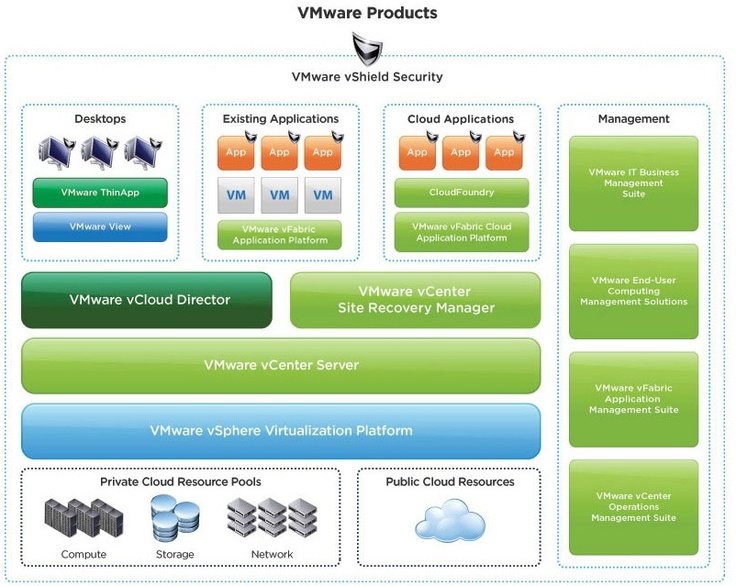
Using VMware products and services for virtualization brings a number of advantages.
Improved return on investment
VMware lets you use more of a physical computer's resources. Administrators dislike running several mission-critical applications on a single server operating system, because if one application crashes it can destabilize the operating system and bring the others down with it. One way to remove that risk is to run each application on its own operating system on its own dedicated physical server — but that is inefficient, since each operating system may use only 30% of a server's CPU power. With VMware you can run each application on its own operating system on the same physical server and make far better use of that server's available CPU power.
More efficient use of energy and space
VMware lets you run more applications on fewer physical servers. Fewer physical servers means less space in your data centre and less energy for power and cooling.
Virtual desktop infrastructure (VDI)
VMware Horizon
Supports both Windows and Linux desktops. You can run your virtual desktops on your own premises or, using Horizon Cloud, across multiple hosted cloud environments. The Horizon suite includes Horizon Apps, a platform that lets you build your own private application store for enterprise users to run on their virtual desktops. Your users can reach a mix of on-premises, SaaS and mobile applications using a single set of sign-on credentials.
Workspace ONE
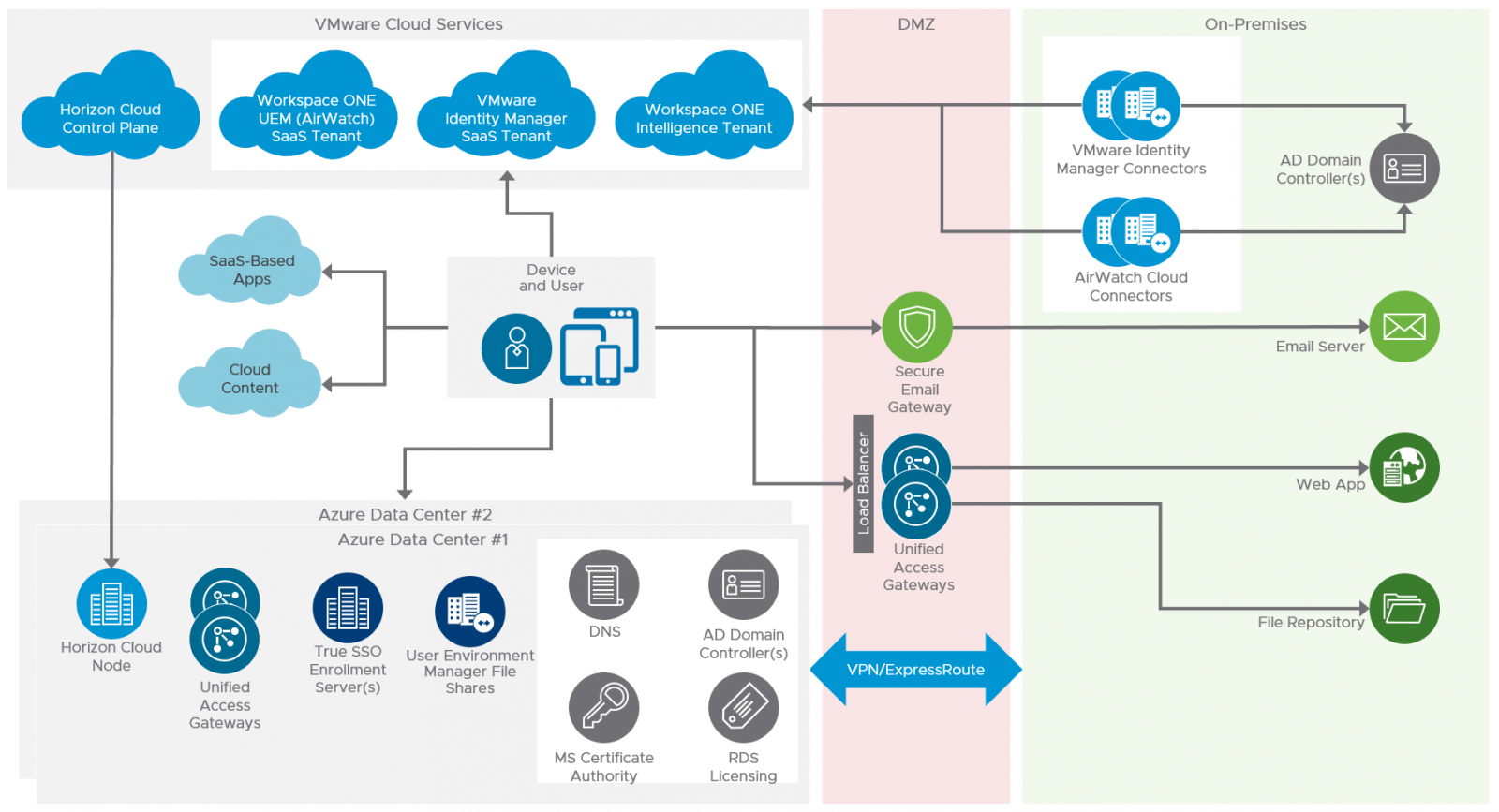
VMware Workspace ONE is an intelligence-driven digital workspace platform that simply and securely delivers and manages any application on any device by integrating access control, application management and multi-platform endpoint management. It begins with consumer-grade, single sign-on access to cloud, mobile, web and Windows applications in one unified catalogue, and includes powerful integrated email, calendar, file and social collaboration tools that engage employees. Employees are put in the driving seat to choose their own devices or make use of employer-provided ones, with the ability to enforce fine-grained, risk-based conditional access policies that also take into account device compliance information supplied by IT's unified endpoint management technology. Workspace ONE automates traditional onboarding and laptop and mobile device configuration, and offers real-time application lifecycle management that connects legacy enterprise client-server applications to the mobile cloud era. The Workspace ONE platform is powered by intelligence and uniquely combines workspace data aggregation and correlation to deliver integrated insights and automation that help organizations manage complexity and security without compromising the user experience.
vSphere
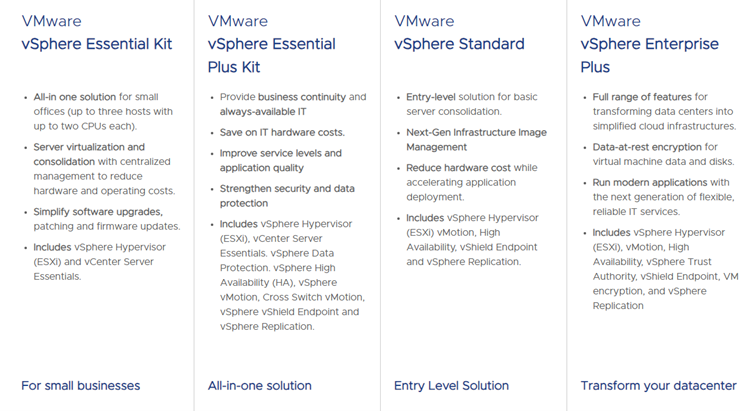
vSphere is available in four configurations: vSphere Essentials Kit, vSphere Essentials Plus Kit, vSphere Standard and vSphere Enterprise Plus. Each supports policy-driven virtual machine storage, live workload migration and built-in cyber security capabilities. The higher-tier options include VM-level encryption, integrated container management, load balancing and central network management. Platinum alone supports automated responses to security threats and integration with third-party security operations tools.
vCenter
One of vSphere's important components is vCenter Server, its management component. It lets you manage virtual machine deployments across a large collection of host servers. It assigns virtual machines to hosts, allocates resources for them, monitors performance and automates workflow. The tool can be used to manage user privileges based on a user's own policies.
Backup and snapshots
Like physical computers, virtual machines need to be backed up. Backup, recovery and deduplication software such as NetBackup or Backup Exec can be used to take virtual machine backups.
A VMware snapshot is a file that preserves the state of a VM and its data at a particular moment. A snapshot lets you restore your virtual machine to the time the snapshot was taken. Snapshots are not backups, because they record only the changes to the original virtual disk file. Only a full backup solution can fully protect your virtual machines.
VMware's main purpose is to help businesses make their information technology infrastructure more flexible, efficient and scalable. Through virtualization technologies you can use resources more effectively, optimize business processes and generally make IT infrastructure easier to manage.