
Blog
Enterprise Vault File System Archiving: Reclaim Critical Space
8 November 2023 · Updated 15 September 2026
As corporate data storage grows, it can rapidly consume a terabyte or more of expensive storage. Storage spent on old or rarely accessed data does not only consume valuable file server resources — it also costs time and money to manage and maintain. By archiving the data on file servers, Veritas Enterprise Vault ™ File System Archiving offers an automated, integrated solution for managing the lifecycle of that data and lowering storage costs.
Enterprise Vault File System Archiving lets you block unwanted or inappropriate content, free up space on the file server, reduce overall storage requirements, and keep all content fully searchable and instantly accessible to the end user or the organization. With the option to retain multiple versions of the same file or document, user-driven recovery of specific content can help reduce the administrative burden considerably.
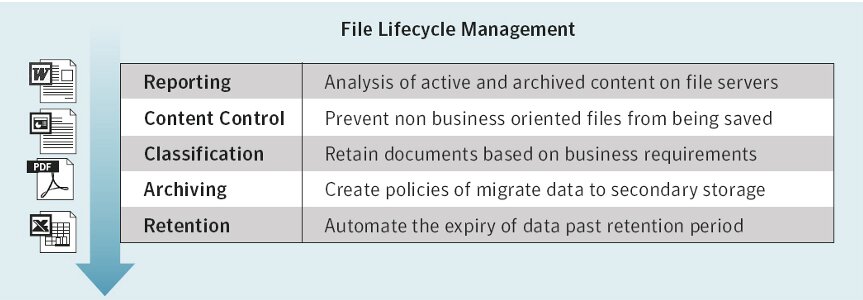
With Enterprise Vault File System Archiving, your business will benefit from the following capabilities:
Reporting and decision analysis: analysis of active and archived content on file servers, including duplicate, old and inactive files.
Content control: preventing files in formats outside company policy (such as MP3, PST and JPEG) from being saved or archived.
Classification: allows data to be classified during archiving using the templates available in Enterprise Vault, such as KVKK and GDPR.
Archiving: flexible, policy-controlled archiving to secondary storage based on file type, age, size and other criteria.
Retention management: automatic deletion of files once their retention period expires, making true file lifecycle management possible.
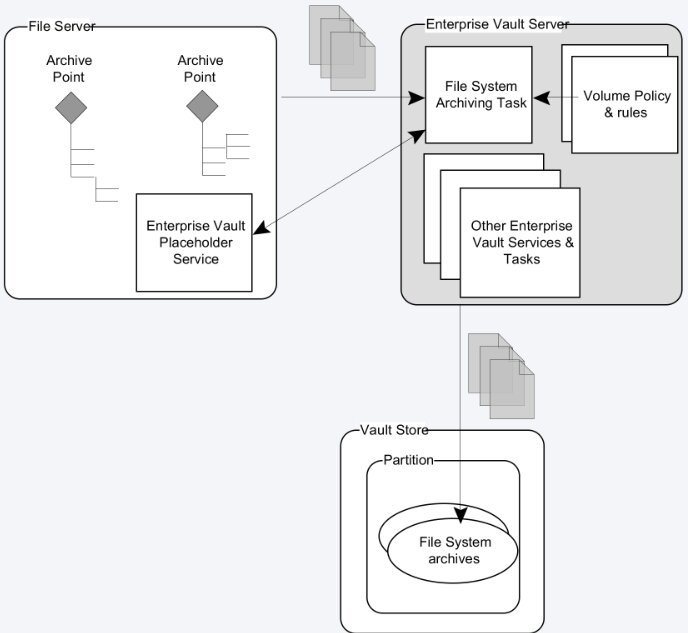
Enterprise Vault software is an industry-leading solution for content archiving. Developed as an extension of the Enterprise Vault archiving framework, Enterprise Vault File System Archiving lets you protect business records across multiple file servers with a single solution. Providing out-of-the-box content management and archiving support for every application that creates and stores information in standard file formats, File System Archiving saves critical space on file servers by blocking unwanted content and moves files seamlessly to alternative storage devices without affecting the end user.
Using policy-based settings, Enterprise Vault lets you archive files by file type, age or other criteria — and even block or delete them. Items are centrally deduplicated, compressed, stored and indexed by Enterprise Vault software, and can be searched and retrieved transparently by users through optional placeholders. Thanks to Enterprise Vault's unique versioning capability, a record of changes over time can be maintained, which can be crucial in compliance and discovery scenarios.
Automatic file classification
For organizations that need a way to classify the files created on the file system, Enterprise Vault File System Archiving makes it possible to build a detailed folder hierarchy with predefined retention policies for any file placed in a folder. Data held in the folder is marked with a retention period that defines how long the item must be kept in order to comply with company policy.
Discovery
Corporate requirements around discovering content are constantly evolving. The ability to respond to a discovery request quickly and efficiently saves organizations time and money. Enterprise Vault File System Archiving enables exactly that rapid discovery of archived data. All file system data indexed within Enterprise Vault can be discovered through the Enterprise Vault Discovery Accelerator application, which lets users quickly target and locate specific files in line with legal discovery, external requests or internal investigations.
Veritas Data Insight integration
Enterprise Vault File System Archiving now integrates with Veritas Data Insight to help provide comprehensive file governance. Data Insight can quickly identify file ownership, unused content and content owned by departed users. Integration with File System Archiving allows users to archive content directly from Data Insight to help with cost reduction (archiving old data, specific file types or content owned by departed users), compliance (enforcing by file ownership) and eDiscovery (archived files touched by a custodian).
The key benefits of File System Archiving
Automated, integrated content archiving
Reclaim space on file servers and apply intelligent compression and indexing to archived files.
Easy policy-driven archiving
Apply policies based on last access time, age, type, size or free space on the volume.
User transparency
Optionally leave shortcuts or placeholders in place of files.
Extended user search
Built-in search technology makes finding content fast and easy through the new Enterprise Vault Search interface.
Reduce storage resources
Block unwanted files or move existing content to more cost-effective storage in order to lower storage costs.
Reduce backup/recovery overhead
Central archiving reduces the amount of production data that must be backed up and restored in the event of a disaster.
Make archived content discoverable
Provide the ability to search, preserve and review archived file system content across the organization.
Records management
Protect business records without user intervention.
Self-service recovery
Users can recover lost or deleted files without administrator involvement.
To sum up, Enterprise Vault File System Archiving lets you block unwanted or inappropriate content, free up space on the file server, reduce overall storage requirements, and keep all content fully searchable and instantly accessible to the end user or the organization.